Tag Archives: screen time

Screen Time – Connection, Context, Content

As a parent, you’ve likely seen countless cautions about the potential dangers of screen time for young children, and you’re exposed to continuous marketing of screen content for children. You know the American Academy of Pediatrics says children 18 – 24 months can begin exploring screen content with their parent, and children 2 – 5 should be limited to 1 hour a day, but you know 10 month olds who are proficient at swiping through photos of themselves on a phone. It can be hard to make sense of it all. Instead of the “just say no” approach to screens, let’s try a more nuanced approach:

We argue that this long-held focus on the quantity of digital media use is now obsolete, and that parents should instead ask themselves and their children questions about screen context (where, when and how digital media are accessed), content (what is being watched or used), and connections (whether and how relationships are facilitated or impeded).           

– The Media Policy Project 

Connection – Are Relationships Facilitated or Impeded?

Screens can disconnect us from each other. In natural communication, we have a series of “serve and returns” – you say something, I respond. I ask a question, you answer. Screens can interrupt that. We’ve all experienced a time when someone glancing at their phone, or the TV that is on “in the background”, pulls our attention away from a conversation we’re in the middle of.

If parents are using a screen, we may not notice a child’s bids for our attention, which can lead to attention seeking behavior, risk-taking, and potentially injury. (This TED Talk video illustrates that nicely while it talks about how parent-child connections build the brain.) When a child is using a screen, they can seem zoned out and a parent may get very frustrated, feeling like they’re not being listened to. For all of us, we can get very irritable when someone else interrupts our screen use, and there can be a “withdrawal period” where it’s hard for us to disconnect from the screen and re-connect to others.

On the other hand, screens can help us to connect. Long-distance, video chats have been a key way for kids to connect to family and friends who are distanced, whether geographically or due to COVID. There are ways we can enhance the connection – peekaboo, puppet shows, guessing games, reading stories, show and tell, drawing together… And screens can connect us with others right at home if we use them together. Co-watching shows and co-playing games can be fun for both participants, can be an enjoyable shared experience to talk about later, can lead us into great conversations about complex topics that might not come up otherwise, or extend the screen experience into real world experiences (like watching a show about science, then doing a hands-on experiment together).

Goal: Decrease times when screens disconnect your family, increase connection during screen use.

Context – Where, When, How?

Co-watching with our child any time they’re watching would be optimal. But let’s be realistic. One of the biggest reasons parents use screen time is to keep kids busy while we do something else! Screens are the easiest way to take a demanding child and keep them passive, stationary, and entertained. And sometimes, we just need that break. Just be intentional and don’t overuse it. Be mindful about unconscious screen time – the TV that’s on all the time, continuous social media check-ins, the Candy Crush… A question to ask yourself… if I didn’t have the screen option, what would we do otherwise?

Consider screen time limits and curfews. Consider screen-free times (like mealtime, family time). Some families have screen free time one hour per day, one full day each week, one week each year.

Set rules for where screens can be used – many experts recommend children only use screens where parents can overhear / see what the child is watching. Consider screen free places (like dining table, bedrooms). Some families have screens in low traffic areas of the house – out of sight, out of mind.

Some families say screen time has to be earned – the child has to complete chores to earn it. Some offer a standard amount each day, but it’s a privilege that the child can lose as a punishment. These can both be viable strategies, but be careful not to make screens too special – a forbidden fruit.

Goal: Whatever rules you set for where, when, how and how much, be sure they are rules you can stick to and enforce consistently. If you let them cheat it some days, they’ll ask to cheat it every day!

Content – What is Being Watched?

All screen use is not equal. For example, social time on screens, like Skype/Facetime calls to family aren’t really “screen time” – they’re social time where the screen is the mechanism that connects us, and don’t need to be limited as other screen use does. (Although you should still practice good screen hygiene – keep screens 18 – 24” from face, use blue shade in the evening, use good posture during calls, take breaks to rest your body and your eyes, and spend time outside in nature each day.)

There’s lots of great educational content for kids. Don’t feel like your kids have to use screens to learn what they need to learn in life. If there are other things they could be doing in the moment – like finger painting or playing in a playground – do that! But, if there are times they’ll be using a screen anyway, choose content that helps them to learn new ideas (like science shows), or experience things they can’t experience at home (like wildlife shows), or drill them in things that are best learned by rote practice (like learning the alphabet or basic math skills).

When choosing content for entertainment time – whether that’s social entertainment for the whole family, or solo entertainment for the child – there’s a wide range in quality, developmental appropriateness and questionable content in children’s media. Read reviews and seek out recommendations for the best content. A fabulous resource is www.commonsensemedia.org.

Try to minimize addictive content. Many screen time activities have lots of reward moments, where your brain is flooded with dopamines, and you want to keep using to get more of the feel-good chemicals. For example, many apps and video games are designed to keep you playing forever: every time you clear one level, another presents itself and you want to keep on playing. Many video apps will auto-play one video after another. Choose slower-paced, calmer items that you “consume” one at a time, without that same addictive reward process, and without ads that make a child crave more.

Goal: choose age appropriate, educational or entertaining content that matches your family’s values and priorities.

Tips for Reducing Screen Time Battles

Plan your screen time – agree ahead of time on when it will start, when it will end, and what you will do together after screen time. Ask them what reminders they need about the plan – for example, do they want to set a timer they can see? Then stick to the plan!

When you’re nearing the end of screen time, instead of giving warnings that you’re about to take the screen away, give reminders that “when you end screen time well, then we get to…”

Instead of just yanking the screen away in the middle of whatever they’re doing, try “joining them” on screen – watching what they’re watching and talking about it, and seeing when a good endpoint is coming (the end of an episode, the completion of a level). Then gradually transition them off.

Resources

Young Children and Zoom

a child looking at a mobile device

Prior to 2020, I don’t think the developers at Zoom (or Skype or Microsoft Teams) ever predicted that their teleconferencing and video chat software would become a platform for parent-toddler classes and online preschool!

Then during coronavirus, all the parents who used to try to minimize screen time for their young children found they needed to utilize it as their child’s primary way to connect to people outside their household. Even as we’ve moved past pandemic, it’s likely that online classes and conversations will continue to be a part of young children’s lives moving forward. (For example, Outschool offers thousands of online classes for children age 3 and up – here’s a review of Outschool.)

How do we make the experience as rich and as developmentally appropriate as we can?

These tips can be helpful whether you’re a parent planning a call between your child and their grandparent, or you’re a preschool teacher planning a class for 20 kids.

Before the Call

Choose a good time of day when the child is relaxed and attentive.

It doesn’t have to be a long call and a big deal – it’s fine to do short calls. A few minutes here and there is great for some kids. On the other hand, it’s also fine to have long calls. I know one family in Seattle where the grandmother in China “comes for breakfast” every day (before grandma turns in for the night.) She “sits at the table” with them, and chats with the children as the parents get ready for the day.

Before the call, gather anything you’ll want to use during the call: books, instruments, and show & tell items so that no one has to step away from the computer during the call – that might cause the child to lose interest.

Prepare the child. Talk about what will happen and how long the visit will be. Remind them who they will be speaking to and what they talked about last time.

Consider staying nearby. Young children may be best able to engage with a zoom call if they’re sitting on their parent’s lap or the parent is sitting beside them. (Note, some organizations, like Outschool, require that adults be off camera, but when I teach preschool age children online, I find that the children who do best in class often have an adult right next to them – I’ll see the parent’s arm reach in to help out. Once children have done several classes, they no longer need that active support, and you may be able to step away and get things done while they’re on a call.)

Teach them to un-mute. The host can mute the child, but not all systems allow the host to un-mute, so be sure the child knows how to un-mute. There are a few choices: if you have a touch screen, the easiest may be to teach them to tap the bottom corner of the screen to bring up the command bar, then tap on the mic icon. Other options: moving the mouse cursor to the bottom of the screen and clicking on the microphone (this can be hard for little ones), pressing alt-a, or holding down the space bar (note: as soon as they let go of the space bar they return to muted.)

Over time, help your child learn Zoom skills to be more independent in the call: how to mute, how to chat, how to use the reactions like clapping, how to share screen. How to place a call. Help them understand what’s happening when their screen buddy “freezes.”

During the Call

Have familiar rituals – perhaps the same greeting each time, or the same song each time – these cues help a young child to remember who they’re speaking to and reconnect.

The remote person should speak slowly and clearly. The person in the room with the child can repeat questions and comments from either side, as needed.

The remote person should look directly at the camera – this will feel like eye contact to the child. Don’t be tempted to look away at other distractions while talking. Use a lot of gestures, body language, and big facial expressions – it’s much more engaging.

Stay unmuted as much as possible so everyone in the call can hear each other and feel as though they’re in the same room.

Consider using a mobile device like a tablet or laptop so you can move around and show each other new things.

Some children focus better if eating a snack while talking – for others, that is distracting. Some children focus better if they have some simple toys nearby to hold in their hands and play with during the call. Others may find that distracting.

Let the child know when the call is nearing its end, and make a clear ending. (Maybe a song, or a story, or something to signal the ending.) Talk about when you’ll “meet” again.

Making Video Chats Interactive

Here are ideas for interactive activities to try out:

  • Play Peek a Boo. Normal style, or by covering the camera and uncovering it.
  • Read Stories. If you have a physical copy of a book, you can hold it up and read it. Or you can scan in pictures of the pages and share those as you read. Or find a YouTube of a read aloud book, but mute their video, and read along with your voice.
  • Sing Songs. With audio lag you can’t sing in unison or it sounds awful. But you CAN take turns singing.
  • Silly Faces. Take turns – who can make the silliest face? (Spotlight them.)
  • Pretend to Be – Take turns pretending to be different animals, or whatever.
  • What is My Stick? Hold up a stick. Demonstrate how it could be a fishing pole, or a baseball bat. Try a few more and ask them to guess what it is.
  • Use Props. Puppet shows can be fun!
  • Make Art Together. Get out art supplies on each end, and draw pictures together. Hold them up to the camera from time to time to share your work.
  • Show and Tell – each person brings an item to show to people and to talk about.
  • Play Guessing Games.
  • Share a travelogue – each person takes pictures of their day, and shares it with the other on the next call.
  • Dance Party. Put on some music and dance!! (Learn how to make music work well on Zoom.)
  • Talent Show – Take turns demonstrating special talents you have: telling jokes, crazy dances, singing songs, patting your head and rubbing your belly…
  • Progressive Stories. One person starts a story: “Once upon a time, a polka-dotted elephant…” then the next person continues “… boarded a spaceship headed for… “
  • Would you Rather? “would you rather ______ or _______”
  • I Spy: Do a google search for “I spy pictures.” Choose one, then share your screen and play I Spy together.
  • Play Simon Says.
  • Play Tic Tac Toe, Hangman, and other pencil and paper games on the Zoom whiteboard.
  • Guess How Many. Person A fills a container with objects (20 pennies? 30 mini marshmallows?) and shows it to Person B. They have to guess how many objects there are, then they count them together. On the next call it’s B’s turn.
  • Scavenger Hunt. Name an object – they run and find it in the house and bring it back.
  • Find the Hidden Object. The remote adult can conspire with the in-house adult. The in-house adult hides an object before the call. During the call, the remote adult can give clues to help the child find the treasure.
  • Pretend to Share Snacks. Plan ahead and have both of you have the same food to eat together. Make it a fancy tea party if you’d like.
  • Go on a walktogether” with mobile devices. Share what you see.
  • Go on a field trip “together.” Lots of zoos, aquariums, and museums have created virtual field trips or have “panda-cams” and such. Go on one together by sharing your screen and talking about what you see. You could also do virtual tourism together. My mother-in-law has found a whole world of “virtual walking tours” on YouTube and goes for walks all over the world every day in her living room.
  • Watch movies together. Share a screen and talk as you watch.
  • For older children (elementary on up), there’s lots more ideas here: https://janelledurham.com/games-interaction-on-zoom/.

I also like this suggestion from Zero to Three: “Be the “hands and heart” of the the person on-screen. When the screen partner “tickles” your baby’s tummy, give your child’s tummy a tickle, too. When a grandparent leans toward the screen to “kiss” your toddler, you can give him a kiss on the cheek. By taking this role, you help nurture the relationship between the child and their on-screen friend.”

Long Distance Babysitters

During the coronavirus stay-at-home time, many parents were with their children 24/7 for a long time with few breaks. You can use a video chat as a “babysitter” to get you a break. Have your child talk with grandpa, or an aunt, or a friend while you rest. If you have a very young child, you may need to be in the same room but at least the child’s attention is captured by someone else. For older children, you may be able to be elsewhere in the house, and let your child know where to find you. I know some parents of elementary age kids who will go for a walk in the neighborhood while their child is online – the remote adult has their cell phone number and can reach them immediately if needed.

Internet Safety

This blog is primarily aimed at parents of kids age 1 to 6, so I assume the parents are nearby during video calls, and keeping their eyes and ears on what is happening. If you have an older child who may be making video calls independently to friends, here are some helpful safety tips.

Audio Quality

If the person on the other end seems to have a hard time hearing you: Figure out whether you need to add an external microphone to make your child audible (especially if they’re speaking with an older person whose hearing isn’t what it used to be). Children tend to have quiet voices and may be hard to hear over a video chat if the internal mic on your device isn’t great. Plus they wiggle around a lot and don’t always stay near the mic. You can test your mic – use the “voice recorder” app on your computer and record your child talking, then play it back. If you can hear it with your speaker volume at any setting, it’s fine. But if you can only hear the recording if you crank your speakers up to 80 or 90 out of 100, then consider buying a mic. (Click for more tips about audio settings.)

Resources

If you’re teaching classes to young children, here’s a handout you can send to the parents about help your child succeed on Zoom.

Here are some of the sources I used when writing this.

While you may be a parent who minimizes screen time for your child, be reassured that, unlike passive screen time, video chat can be positive for a child’s development:  https://www.npr.org/sections/13.7/2016/10/03/496362094/could-video-chats-be-good-for-your-infant

Screen Time in Coronavirus Time

sciemcenews

So, you’ve all heard the cautions about too much screen time. For example, the statement from the American Academy of Pediatrics, which talks of risks like obesity, sleep challenges, exposure to inappropriate content and more. We’ve worried about how much screen time was too much.

And then… covid-19 came. And for most kids, screen time began to fill way more hours than in life before coronavirus.

We have a 9 year old and he spends so many hours on screen now: 2 – 3 hours a day on school work; teleconferences for school, for Sunday school, for appointments with his psychologist; Skype calls with his siblings and grandparents who we can’t see in person; playdates on Zoom; Wii sports on rainy days; ebooks since the library is closed, and a couple family movie nights a week. Plus, his reward for completing his day’s school work is… yep, you guessed it… a little screen time playing Pokemon or Minecraft.

It’s more screen time than we could have previously imagined. It’s certainly not optimal for development. But it is the current reality for many of us. So, rather than talking about “just say no to screen time”, I think we need to take more of a harm-reduction approach.

So, we’ll look first at how to keep young eyes and young bodies healthy while using screens, then we’ll take pointers from this approach, from the Media Policy Project:

We argue that this long-held focus on the quantity of digital media use is now obsolete, and that parents should instead ask themselves and their children questions about screen context (where, when and how digital media are accessed), content (what is being watched or used), and connections (whether and how relationships are facilitated or impeded).

Here are some tips, collated from lots of sources:

Improve “Screen Hygiene” During Use

For their eyes:

  • Screens should be 18 – 24 inches from eyes
  • Use screens in locations with good lighting without a lot of glare (or consider a matte screen filter)
  • Adjust brightness and contrast for comfort
  • Consider night mode or blue shade mode on devices after about 7 pm to shut out the blue light which can disrupt sleep
  • Remind your child to blink now and then to avoid dry eyes and eye strain
  • 20-20-20 breaks: Set a timer – every 20 minutes, they should look at something 20’ away for 20 seconds (plus spend some time outdoors every day, looking at a far distance)

For their body:

  • Use good posture – typical advice is to sit so there’s a 90 degree angle at your ankles, your knees, and your hips, and that your elbows are at a 90 degree angle as your hands rest on the keyboard. Start with that advice, but then adjust as needed for your child’s personal comfort.
  • Choose good furniture – if you don’t have furniture that fits your child for their screen use, perhaps look for inexpensive options to help their posture
  • Vary seating choices – if possible, have multiple work stations so they’re not putting weight on exactly the same parts of their body all day long every day, or have an exercise ball to sit on, or a standing-desk station
  • Stretch breaks – encourage your child to take breaks between activities… at the end of a chapter, after finishing a school assignment, every 20 minutes, whatever “signposts” make sense; dance breaks are also great (try gonoodle.com)

Context Matters

Think about when, where and how screens are being used. Establish daily routines. Make sure you’re clear on when and where screens can be used, and when and where they’re limited or off-limits.

Take Breaks from Screens

Try to create some screen-free times in your day and in your week.

  • No screens at mealtimes? Many families declare the table to be a screen free zone so you have a chance to connect as a family and practice social skills and casual conversation. (Also, screen use during meals is strongly associated with obesity.)
  • Screen free days? I know several families who declare one day a week (often a Saturday or Sunday) to be screen-free.
  • Consider screen curfews: the light from screen media and the high stimulation caused by screens can delay sleep onset, and shorten sleep duration (source). Avoid screens right before bedtime.
  • Consider no screens in the bedroom: even if they’re “just charging”, they can buzz or light up as notifications come in, and this can disrupt sleep, and tempt your child to return to the screen at any hour of the night.
  • Be sure to balance screen time with physical activity, and with social interaction between members of the household.
  • Be sure to include some time every day outdoors – even if the weather is dreadful. Do choose outdoor areas that are less populated, rather than crowded parks, so it’s easy to maintain social distancing.
    • When we are indoors and using screens, we’re triggering our sympathetic nervous system – adrenaline responses keep us intensely focused, which is helpful for work, but exhausting to our bodies.
    • When we are outdoors, we shift to our parasympathetic nervous system, which is about conserving energy while the body is at rest, so the body and mind can heal itself. After spending just a few minutes in nature, we have lower pulse rates, lower blood pressure, lower cortisol levels.
    • Read more about the benefits of outdoor time.

Content Matters

Not all screen time is created equal. Some is helpful and beneficial, especially in this time of social isolation. Screens offer opportunities for learning, connection, adventure, and entertainment.

Some screen time is less helpful. Let’s think about some categories of screen use, and for each, figure out how to increase the benefits, and reduce the downsides.

  • Social time with friends and family on screens – Skype, Facetime, etc.
    • Connection Matters. I believe that when we are physically distant, having interactive conversations with others, even if it’s on a screen, is truly essential for our mental health and for a child’s developing social skills.
    • If you as a parent need a break during your time home 24-7 with a child, this social screen time with someone else can offer that to you. Our 26 year old son “babysits” our 9 year old over a Skype call while my husband and I have a date night at home.
    • For young children, think about how to make it as interactive as you can. For little ones, it helps to add a physical component – have your child show grandma a favorite toy – grandma can show your child the steps they’re doing as they cook a meal. It may be easier for your child to pay attention if someone is reading them a book rather than trying to engage them in a conversation. (Note for those who might not have kid books at home: on YouTube, you can find LOTS of great kid book read-alouds – I share my screen on Zoom and show the video to a child with the sound muted and I read the words.)
    • For older kids, try playing games together online: charades? hangman? There’s lots of online gaming platforms, like Jackbox games, kahoot.it, Ravensburger jigsaw puzzles, and more.
    • If you want a break away from the screen, consider also trying phone calls while going for a walk.
  • School work on screens – lots of school work is now online
    • Think about whether any of it can be physical work. For example, is there anywhere you can print a worksheet and have your child write on it with a pencil rather than using a stylus on a screen? If the math book is showing pictures of blocks, can you pull out real blocks? Instead of writing a paper on the computer, can they hand-write it, scan it, and email it in?
    • For younger children, kindergarten through second grade, you may want to ask their teacher if you can opt out of some of the online learning and instead do hands-on learning at home.
    • Have your child talk to you (or a family member or friend) about the work they’ve done – that helps move it off the screen and into their interactive brain.
  • Online extra-curriculars and summer camps
    • As summer arrives, many parents (especially working parents) are wondering how to keep their kids occupied and engaged. And while I’d encourage lots of outdoor time, and art, and free play, if you turn to screens, consider something like Outschool, which offers interactive online classes with a teacher and a small group of kids.
  • TV, Movies, Videos
    • Ask yourself: Could you find books or audio books or podcasts that engage them as much in stories? (My son listens to story podcasts as he builds Lego.)
    • Can you watch together and make it a social activity instead of them watching alone? Or could they watch with a friend or family member using Zoom or Skype and sharing a screen, or using Amazon watch parties on Twitch?
    • Choose quality TV or video that teaches something, shows diverse people and experiences and reflects your family values. I really love Common Sense Media for researching our options.
    • Choose things that take you on an adventure outside your home. This is a great time for nature documentaries, or shows about foreign lands – anything with a touch of the exotic can be a welcome break!
    • Have your child watch where you can keep eyes and ears on what they’re watching.
    • If your child is using YouTube or other similar platforms, check their history now and then to make sure they’re making appropriate choices, and have conversations with them about what they’re consuming.
    • Set limits on what’s appropriate in your family and what’s not. If your child violates those limits, then impose consequences – take away entertainment screen time.
  • Video games – I’ve got a kid whose deepest passions are video games, so I get that they’re an easy motivator to get kids to do another thing they don’t want to do (i.e. if you finish your school work you can play Pokemon…). Just try not to over-use them.
    • Ask yourself: Is there something else they could do? Is there some other reward that would motivate them?
    • Can you play together and make it a social activity instead of them playing alone?
    • Choose games with challenges – instead of just mindless Candy Crush games or platforming games that only teach hand-eye coordination, look for games with some cognitive challenges too – perhaps puzzles to solve, or building challenges to pursue.
    • Minimize games with lots of violence or age-inappropriate language, sexuality, and situations. Again, check out reviews on Common Sense Media or elsewhere.
  • Escape / Zoning Out – Realistically, in our current quarantined life, sometimes we just want to escape into something, and screens offer an easy escape. If you catch yourself doomscrolling or binging Netflix, or catch your child zoning out with a screen, think:
    • What else could we do – could we just go for a walk? Or exercise? Put on music and dance? Do some crafts, play some games? Choose things that emphasize social connections and emphasize physical movement as a balance for all that screen time.
    • Try to minimize background TV and mindless clicking through social media. If you need the occasional zoning out time, consider setting a timer to remind yourself to look up and ask yourself if you want to continue or if you’re ready to move on to another activity.

What Else?

Several of my points above were “ask  yourself what else you could do.” I think that’s a key thing. If you consider what all your options are in the moment, and the screen solution is the best answer, then use the screen without feeling guilty. But, if you can think of other satisfying options, then choose those more often.

Now might be the time to try something new: Yes, you can be one of those folks who is telling everyone on social media about your families’ new hobbies – new musical instruments, your family’s first garden, your sourdough starter projects, roller blading adventures, art work, your new puppy, or the domino chain Rube Goldberg your child built!

As much as we love Lego in our family, I’ve previously resisted just having a bin out all the time. The clutter bugs me. But, in the midst of this quarantine-time, we’ve surrendered half of our dining table to a free-build Lego zone to encourage that hands-on play whenever possible. And this weekend, I think we’ll set up a tent in the living room, and toss a pile of books inside.

Read More:

I’ve written previously about the Benefits and Risks of Screen Time, and Making Screen Time Work for Your Family. It has a lot more tips about how to choose appropriate content, especially for toddlers and preschoolers.

The most helpful article I have found on the topic of coronavirus screen time is “Screen Time Recommendations For Parents: How Much Is Too Much For Kids?” from Child Development Institute https://childdevelopmentinfo.com/screen-time/screen-time-recommendations-for-parents-how-much-is-too-much-for-kids

My final piece of advice is be gentle on yourself – don’t feel guilty for using screens! We’re parenting in a situation unlike any other before us, and we’ll just have to do the best we can to make it through each day.

Computer Skills and Kindergarten Readiness

img_20170103_095724633

There’s lots of information about the benefits and risks of screen time (TV, computers, video games, etc.), lots of opinions on whether young children should or should not be exposed, and advice on making screen time work for your family. Some parents might choose to avoid screen time through their child’s preschool years, and some may not have access to technology at home.*

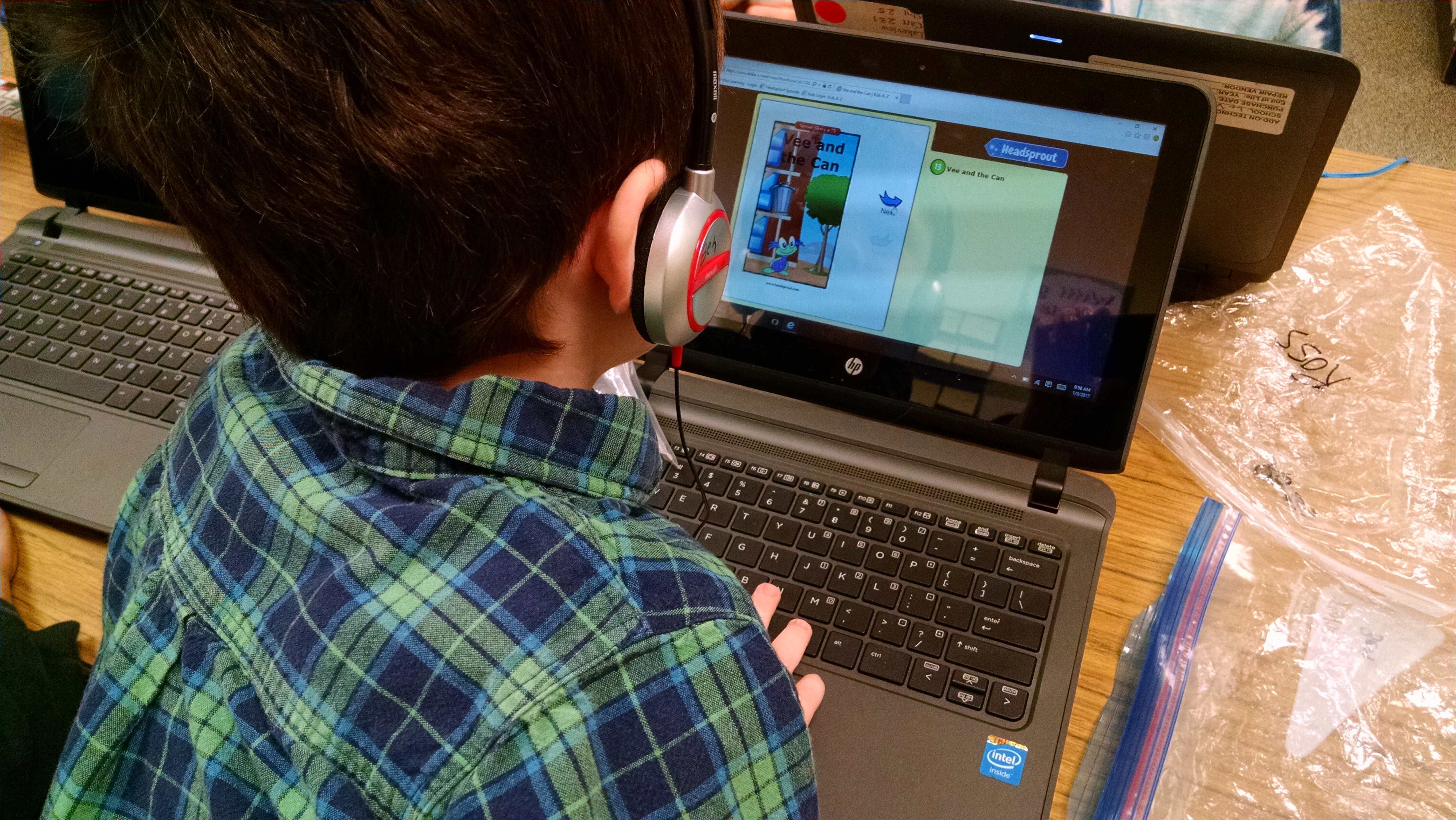
But, I think it’s important for parents and early childhood educators to know that basic computer skills and tablet skills are becoming a part of kindergarten readiness.

The picture above is from my son’s kindergarten classroom in the Lake Washington School District (eastside suburbs of Seattle). Every morning, during reading stations, one station is using computer-based reading programs, such as HeadSprout. They also use DreamBox for math skills. Computer-based programs are an engaging way to drill kids in some basic math and literacy skills. But only if the child knows how to use a computer.

Today I watched several kids using the software with no problem, easily navigating use of the touchpad mouse, and the touchscreen, and understanding concepts like minimizing and maximizing windows, using their fingers to magnify an image on the screen, and so on. And I watched one child who lacked any basic understanding of how any of that worked. He poked randomly at the screen, getting random results – sometimes it worked, sometimes it didn’t. No real learning was happening during the almost 20 minutes he spent trying to figure out how the computer works. The learning value lost in that 20 minutes only puts him farther behind his classmates.

So, I’m now adding to my list of skills for kindergarten readiness. I would recommend that all kids entering public kindergarten (at least in areas that have computers in the kindergarten classroom) have these basic skills:

  • know how to use both a mouse and a touchpad mouse – they know how to move the arrow around, understand the ideas of both clicking, and double-clicking
  • know how to use a touch screen – again, both how to move the arrow around and how to click; bonus points for understanding gestures like pinch to make an image smaller, swipe to advance to another screen, drag to move an item. (Look here and here for two guides to all the gestures that are typically used on touchscreens.)
  • have played with educational software / apps where they are given verbal instructions that they should follow

So, if you have access to this technology at home, consider adding in some computer skill learning for your child at least 3 – 6 months before they start kindergarten. If you want recommendations and reviews for kids’ games and apps, check out Common Sense Media.

If you don’t have access to this technology at home (In 2012, 72% had access to the internet at home. In 2016, 72% of Americans own a smartphone, which has likely increased the number of households with access to the internet), check whether it’s available at your local library or elsewhere in your community. Here in King County, all the libraries have public computers in their children’s areas that are loaded with lots of educational software, and will allow them to learn mouse skills and headphone use. (They do not have touch screens to my knowledge.)

I don’t think children need a lot of computer time – just enough to gain some basic skills and knowledge. The majority of a preschooler’s time should be spent engaged hands-on with their world, with time spent playing with open-ended toys, outdoor time, and free play time with peers.

A book about balancing screen time and outdoor time

I wanted to write about the book Dot. by Zuckerberg and Berger. It’s an intriguing book that reviewers on Amazon either love or hate, and it inspires debate about the place of screen time in children’s lives.

First, an overview of the book. This is a picture book for 3 – 6 year olds, with appealing illustrations, a charming main character (6 or 7 years old?), and an engaging story line.

It begins with Dot using her laptop and tablet – “She knows how to tap… to touch… to tweet… and to tag.” We also see her using a cell phone and Skype / FaceTime to talk and talk and talk. She is bright, happy, and enjoying her time with her tech. (Though her dog is looking pretty disappointed in this sedentary, indoor lifestyle.)

But then Dot succumbs to a moment of exhausted ennui.

Mom says “Go outside… time to recharge!” Dot sleepwalks out the door.

But then, outside, she smiles. She remembers… “to tap… to touch…. to tweet… to tag… to talk and talk and talk.” (This time the illustrations show her tap dancing, touching a sunflower, tweeting like the birds in the tree, tagging friends in a game, and talking while walking in the fields, always smiling and always accompanied by friends.)

She is bright, happy, and enjoying her time outside with friends.

But she hasn’t completely abandoned technology – on the last page, she uses her phone to snap a photo of a friend, and another friend is using a tablet, as they swing, and paint, and play outside with their dogs.

The negative reviews

Some reviewers are dumb-founded that a child would even use technology in this way (leaving me to wonder whether they’re parents themselves and if so, if their kids are now middle aged adults… My 22 year old was using a mouse and a desktop computer to play games at the age of three – definitely a digital native. My 5 year old learned how to swipe to the next photo on my phone when he was 8 or 9 months old. Not just a digital native – totally immersed in the mobile technology world, like most children his age. (Read here about how much screen time children have in the U.S.)

Multiple negative reviews talk about the unlimited screen time and the lack of parental supervision in the book. “I don’t know any 6 year old who has such free reign with so many tech devices and, even worse, goes unsupervised. Is this really what our world has come to? I think not, and the idea of suggesting something so absurd is upsetting to me.” It is true that we don’t SEE a parent in the book. But this is OFTEN the case with children’s books: as one commenter said “Where are Harold’s parents, for that matter, and why does the poor child have only a purple crayon? How could those Seuss children’s mother have left them home alone for the whole day, and didn’t she teach them NOT to open the door to strangers?” But it is the mother who intervenes and sends the child outdoors to play. So, clearly there is supervision and there are screen time limits.

And of course, other reviewers were appalled that the child was allowed any screen time, citing concerns about the harms of radiation from cell phones, obesity, online stalking, adult websites, and more. (You can read my summary about benefits and risks of screen time here.)  “As parents, our job is to shield young children from information technology in the early years of life, not encourage it. Just where does Dot get her tech devices? She cannot afford them on her own, so her parent must be purchasing them for her. This sets the wrong precedent about our role as parents of young children: Parents as addiction enablers, not protectors.”

Other reviewers note that the character tweets and shares (presumably on Facebook) which are not typically activities that a 6 year old girl (like our protagonist) would do, and certainly not what a 3 – 5 year old (like our audience) would do. I was willing to let this slide, because of how they play with the words “tweet” and “share” later on in a different context.

There’s others who feel like it’s an advertisement for technology – the author, Randi Zuckerberg is the sister of Facebook founder Mark Z.

Positive Reviews:

My 3 year-old is enjoying this book. Tonight she says “Go outside Dot!” and that’s the message that she’s getting. Technology is fun but after a while you need to go outside.

“The “Dot.” character is extremely loveable and its easy to relate to her journey as she struggles with the differing forces in today’s society — the pull of technology versus being outside in nature and developing a sense of community.”

“I ordered this book to read as the technology facilitator for a k-5 school. Kids love it…Opens the floor for good conversation.”

I bought this book for my three-year-old son and he absolutely loves it. He knew how to ‘swipe’ on an iPad shortly after turning one. I love the overall message of the story, as technology is a big part of our culture and it is not going away. This book reminds us while technology is exciting and beneficial to our daily lives, so is enjoying friends, family and the outdoors. As we move into the future I want my son to always remember the importance of this balance, and I think this story represents that message well.

“I am a pediatrician in practice for 20yrs and really like that it brings up the importance of getting outside & playing. Since it is a reality that children are on electronics starting from a young age, the idea that what they learn on the computer can be made fun & relate to the outside world is a great concept. Its an easy way for parents & kids to have a simple conversation about the importance of balance in their life starting from a young age.”

My thoughts

This is a cute little book. I’m not saying “wow, one of the best books I’ve ever read.” But it is a nice read, and a good basic summary of the need to find a balance between technology and outdoor / active / social play. It’s a good discussion starter.

Some parents choose to strictly limit their children’s exposure to screens. If you’re a screen-free family (or very limited screen use), this is not the book for you.

But if you are a family who uses a lot of technology, and tries to balance it with other opportunities, this could be a good book to share with your children about the joys of other types of play.

You can check out my collection of Tips for Making Screen Time Work for Your Family.